
What Protection Features Does My Smart Plug Provide
This page explains all available protection features for smart plugs and power strips, including their functions, availability, and setup instructions.
Note: Support features may vary by model. Please refer to the actual app interface for availability.
Key Takeaways
- Charge Guard is a protection feature that automatically cuts power after estimating a connected device is fully charged to reduce battery aging and prolong connected electronics' battery life.
- Power Protection is a customizable feature that automatically cuts power when connected devices exceed a user-set power threshold, preventing equipment damage from over-power conditions.
- Surge protection is a permanently enabled protection feature for the Kasa plug that shields sensitive connected electronics from damage caused by sudden power surges and short-duration voltage spikes up to 6000 Volts.
- A built-in resettable circuit breaker is a permanently enabled protection feature for Kasa Smart Wi-Fi Power Strips that stops electricity flow during circuit overload to prevent overheating and potential fire hazards.
Instructions for the Protection Features
Charge Guard
Function Introduction
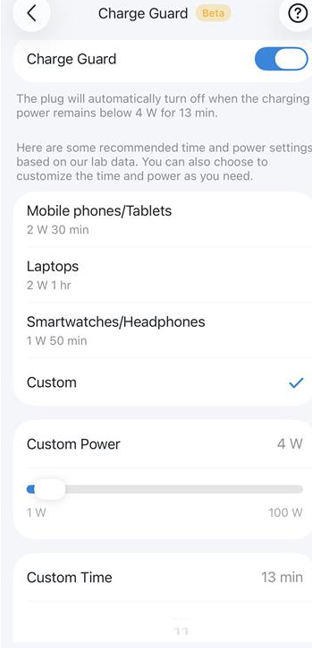
It automatically cuts off power output after confirming a connected device is fully charged. It works by tracking real-time charging power: when a device nears full capacity, charging power drops to a consistently low level; once this low-power state persists, Charge Guard confirms the device is fully charged and automatically cuts power.
This prevents overcharging, reduces battery degradation, and extends your device’s battery life.
Setup
1. Go to the smart plug's Device Settings > Charge Guard and enable it.
2. Select one of the preset parameter modes or customize the power and time yourself.
Power Protection
Function Introduction
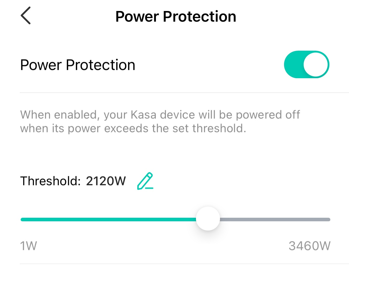
When the actual power of connected devices exceeds the threshold you set, this function automatically cuts off the device's power output to prevent equipment damage from overpower.
Setup
1. Go to the smart plug's Device Settings > Power Protection and enable it.
2. You can customize the power threshold and enable this function in the Kasa app.
Surge Protection
Function Introduction
Surge protection adds an extra layer of protection for connected electronics and appliances, shielding sensitive devices from sudden power surges caused by thunderstorms or other power events.
Most overvoltage damage comes from two types of abnormal power input: short-duration voltage spikes and long-duration high-voltage surges, both of which can reach up to 6000 Volts. Microchips built into common electronics (computers, telephones, TVs, stereos, etc.) are highly sensitive to voltage irregularities, and this function prevents damage from abnormal voltage.
Setup
- This function is automatically and permanently enabled, so there is no on/off control for it on the device body or in the Kasa app.
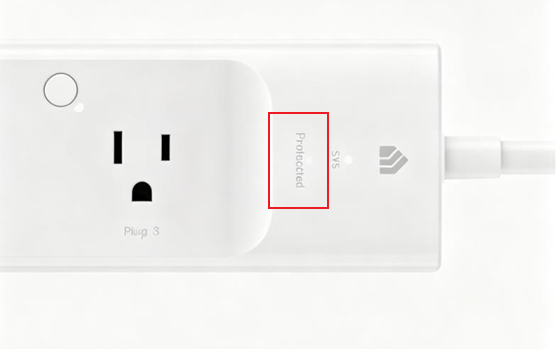
- You can check the working status of the surge protector via the LED indicator on the device.
Note: You cannot replace fuses in your surge protector. There are no user-serviceable parts inside the Kasa Smart Wi-Fi Power Strip. If the surge protector malfunctions, please contact our customer service for support.
Circuit Breaker
Function Introduction
The Kasa Smart Wi-Fi Power Strip’s built-in, resettable circuit breaker stops the flow of electricity when the circuit becomes overloaded. In other words, when the electricity required to power electronics plugged into the power strip exceeds what the unit can handle, the circuit breaker prevents the power strip from overheating and causing a potential fire.
Setup
This function is automatically and permanently enabled, so the device body and the Kasa app have no on/off control for it.
To get to know more details of each function and configuration, please go to the Download Center to download the manual for your product.
Looking For More
¿Es útil esta pregunta frecuente?
Sus comentarios nos ayudan a mejorar este sitio.



TP-Link Community
Still need help? Search for answers, ask questions, and get help from TP-Link experts and other users around the world.